The Debrid Streaming Player Guide: One App for TorBox + Real-Debrid
You use Real-Debrid or TorBox for high-quality streaming links. But you still jump between apps, hunt for working links, and cannot bring live TV into the same player. Here is how a dedicated debrid streaming player on Android TV ends that fragmentation, and why one player is finally enough.
13 min read
Debrid streaming is powerful but fragmented. You sign up for Real-Debrid or TorBox to get access to cached torrents that play instantly at high bitrates. That part works well. The friction comes when you try to watch on your TV: you either cast from your phone, use a laptop, or set up Stremio or Kodi with addons that feel like they belong on a desktop, not a ten-foot living-room screen.
The result is a split experience. One app for IPTV live channels. Another app for debrid movies. You keep track of which source has what, and you manage multiple UIs with different remote behaviors. The debrid streaming player category exists to close that gap, but not all players are built the same way, and the differences matter once you are three remote-clicks deep into a dead link on a Friday night.
This guide covers what a debrid streaming player actually is, which Android TV players support debrid natively, how the setup works step by step, and how MIRA Player handles the whole thing with features like multi-link auto-failover and unified IPTV+debrid aggregation. One thing to be clear about up front: MIRA Player is a player, not a content service. It connects to the debrid accounts and subscriptions you already pay for and supplies nothing of its own. If you want to stop app-hopping and watch everything you have access to from one clean player, this is how it works.
What is a debrid streaming player and why do you need one on Android TV?
A debrid streaming player is an Android TV app that fetches and plays content from debrid services like Real-Debrid and TorBox directly, without a separate computer or a casting setup. It gives you a full-screen, remote-friendly interface with a library, watch history, and best-quality auto-selection, so the content you already have access to behaves like a native TV app instead of a desktop tool bolted onto your couch.
Debrid services are not streaming platforms, and that distinction is the whole point. They are link resolvers. You give them a torrent file or a magnet link, they check whether that content is already cached on their servers, and if it is, they hand back a direct HTTPS link. That link plays in almost any media player. A debrid streaming player automates the steps in between: it talks to the debrid API, reads the files linked to your account, and presents everything in a browsable library with posters, titles, and quality labels.
The reason this matters on a TV specifically is the input device. A keyboard and mouse make addon configuration and manual link-picking tolerable. A directional remote with an OK button does not. Every extra step you have to perform with a five-button remote is friction multiplied. A player built for Android TV removes those steps: you authenticate once, and from then on you browse, you press play, and the player resolves the link behind the scenes.
Without a dedicated player, you fall back on a workaround. The most common one is Stremio plus a community addon. It works, but it carries limits: no native live TV, no electronic program guide (EPG), no multi-link failover, and no unified library that also includes your IPTV channels. A true debrid streaming player treats debrid as a first-class source layer instead of an afterthought, which is what lets it sit next to live TV in one library rather than living in its own silo.
On Android TV you also want a player that installs cleanly, respects the platform, and supports the audio and video the hardware can actually output. Android TV and Google TV are designed around a leanback, remote-first interface, and Google publishes the interface and media guidelines apps are expected to follow in its Android TV docs. A player that honors those guidelines feels native on the platform. One that does not feels like a phone app stretched onto a wall.
Which Android TV players support Real-Debrid and TorBox?
Only a handful of Android TV players support debrid natively or through addons, and the quality of that support varies widely. Stremio and Kodi reach debrid through community addons, TiviMate does not support debrid at all, and MIRA Player integrates Real-Debrid and TorBox directly. Here is how the major players compare as of June 2026, followed by the honest read on each.
| Player | Debrid Support | IPTV Support | Auto-Failover | Price |
|---|---|---|---|---|
| MIRA Player | Native (Real-Debrid + TorBox) | Yes (multi-playlist, EPG, catch-up and recording where your provider supports it) | Yes (multi-source, across debrid and IPTV) | $20/year |
| Stremio | Via addon (community resolvers) | No (no live TV, no EPG) | No | Free |
| Kodi | Via addon | Yes (PVR addon, setup-heavy) | Partial (addon-level, not player-level) | Free |
| TiviMate | No | Yes (M3U, Xtream, EPG, recording) | No | $33.99 lifetime (up to 5 devices) |
Stremio is the most popular choice for debrid streaming, and it earns that reputation. Stremio reports more than 20 million users (per Stremio's reporting, as of 2026), it is free, and its addon for resolving cached debrid links is reliable for movies and shows. Connecting it to a debrid account is straightforward, and you can read exactly what the service resolves on the official Real-Debrid site. The honest limitation is structural: Stremio has no live TV support, no native EPG, and no failover. If a debrid link dies, you back out and pick another one by hand.
Kodi can do almost anything through addons, which is its strength and its tax. To get debrid working you install a build or a skin, add repositories, configure a debrid addon, enter your key, and frequently tune buffer and cache sizes. It runs well once it is dialed in, but it is not a sit-down-and-go experience, and the interface is not built for the simplicity many cord-cutters actually want. The failover some Kodi addons offer lives at the addon layer, not the player layer, so it behaves differently depending on which addon you used.
TiviMate is one of the best pure IPTV players available, full stop. It handles playlists, EPG, catch-up, and recording with polish that most competitors cannot match, and at $33.99 lifetime for up to five devices (Google Play, as of June 2026) it is a fair deal for IPTV-only users. The catch is simple: it has zero debrid support. If you want both IPTV and debrid, TiviMate is half the solution and you are running a second app for the other half.
MIRA Player is the one that supports both Real-Debrid and TorBox natively, with no addons, and brings them together with IPTV in a single library. It also adds multi-link auto-failover across sources. As of 2026, MIRA Player is the only major Android TV player with built-in multi-link auto-failover; TiviMate, Stremio, and Kodi do not have it natively. That is the line that separates it from the rest, and the sections below explain exactly what it does and where the honest limits are.
How does MIRA Player handle debrid streaming differently?
MIRA Player treats debrid as a core source type, not a bolt-on. Instead of scraping torrent sites through an addon and resolving through debrid, it integrates with the Real-Debrid and TorBox APIs directly. You enter your API key once in the source manager, the player reads the files linked to your account, and everything lands in a unified library alongside your other configured sources. The key is encrypted and never used for analytics.
Here is what actually happens in practice. Open MIRA Player on your Android TV. Go to the source manager, choose Real-Debrid or TorBox, and paste your API key. Within seconds the player reads your debrid account, organizes the cached files by title and quality, and places them in the movie and show sections. There are no addons to install, no repositories to add, and no separate dashboard to keep open on another device. You connect to TorBox or Real-Debrid the same way, and you can connect both at once.
The ranked quality auto-pick engine does the deciding for you. For each title it scores every available source on resolution, codec (HEVC versus AVC), whether the file is a REMUX or a transcode, and source health, then plays the best viable option automatically. You do not have to choose between a 4K HDR REMUX from one debrid account and a 1080p encode from another. The player ranks them and plays the top one that will actually start. If you care about the difference between a REMUX and a re-encode and why it affects what you should pick, our lossless and REMUX guide breaks it down.
This matters because debrid libraries routinely hold several copies of the same movie at different qualities and from different release groups. MIRA Player deduplicates and ranks them in the background so you are not scrolling a wall of near-identical entries. You press play and get the best stream the player can verify.
The part most setup guides skip is what the player does after it groups your sources. Because debrid sits in the same library as your IPTV and any subscription deep-launches you have configured, a single title can be backed by more than one source at once. That is the foundation the failover system is built on, and it is why MIRA Player can do something the addon-based players cannot.
What is multi-link auto-failover and how does it apply to debrid?
Multi-link auto-failover means that when a stream stops working, the player rotates to the next configured source for the same title automatically, in the background, without you touching the remote. It is already the defining feature of MIRA Player for IPTV, and it extends to debrid. If you have configured both Real-Debrid and TorBox and a link from one fails, the player switches to the other on its own.
The honest limitation is that failover does not prevent the first failure. It reduces the impact of dead streams; it does not make them impossible. Debrid links are generally reliable because the file is cached on the service's own servers, but failures still occur: a server overload on a popular new release, a transient routing problem, or a file pulled for a copyright claim. When that happens without failover, you back out, reopen the title, and try a different link manually. With failover, the player detects the dead stream and rotates to the next working source for you.
Failover works across any two or more sources that resolve to the same title, and this is where unifying debrid and IPTV pays off. If an IPTV provider you subscribe to carries a movie channel and you also have a debrid copy of that movie, the player can rotate from the live stream to the debrid link, or the other way around. That cross-source redundancy is the capability no other Android TV player offers at the player level today.
What triggers a failover, concretely. The player watches for the signals that mean a stream is not going to recover on its own: a connection timeout, an HTTP error such as a 403 or 503 from the source, or a frozen frame where the buffer stops advancing. When it sees one of those, it does not sit and spin. It moves to the next ranked source for that title. For the full detection logic, the timing windows, and how to customize the behavior, see the IPTV auto-failover guide, which covers the same engine in depth.
One practical note on configuration. Failover only helps when a title has more than one backing source, so the payoff scales with how many sources you connect. Connecting both Real-Debrid and TorBox, plus any IPTV playlists, gives the ranking and failover systems the most to work with.
Can one app handle both IPTV and debrid without compromises?
Yes, and unifying them is the specific problem MIRA Player was built to solve. You add your IPTV playlists (M3U or Xtream Codes) and your debrid API keys, and the player merges everything into a single library with cross-source search, a shared watch history, and a combined EPG for live channels. Live TV and on-demand content sit in one place instead of two apps with two remotes' worth of muscle memory.
In practice this means you can watch a live sports channel from your IPTV provider, then search for a film and play it from your Real-Debrid account without leaving the player. The on-screen guide drives the live channels. The movie and show sections pull from debrid and any VOD packages your providers include. An "Available On" view shows which of your connected sources carries a given title, so you can pick the one with the best quality or the one that gives failover something to fall back to.
Because MIRA Player is a player and not a service, you stay in control of every source. The player hosts no content of its own. It does not bundle channels, it does not ship a catalog, and it does not resolve anything you have not connected. You bring your own subscriptions, playlists, and debrid accounts, and the player organizes them into one coherent experience. That is the line between a player and a platform, and it is also why your access stays portable: if you change debrid providers or IPTV services next year, you swap the source, and the library reorganizes around what you actually have.
How do you set up Real-Debrid or TorBox in a debrid streaming player?
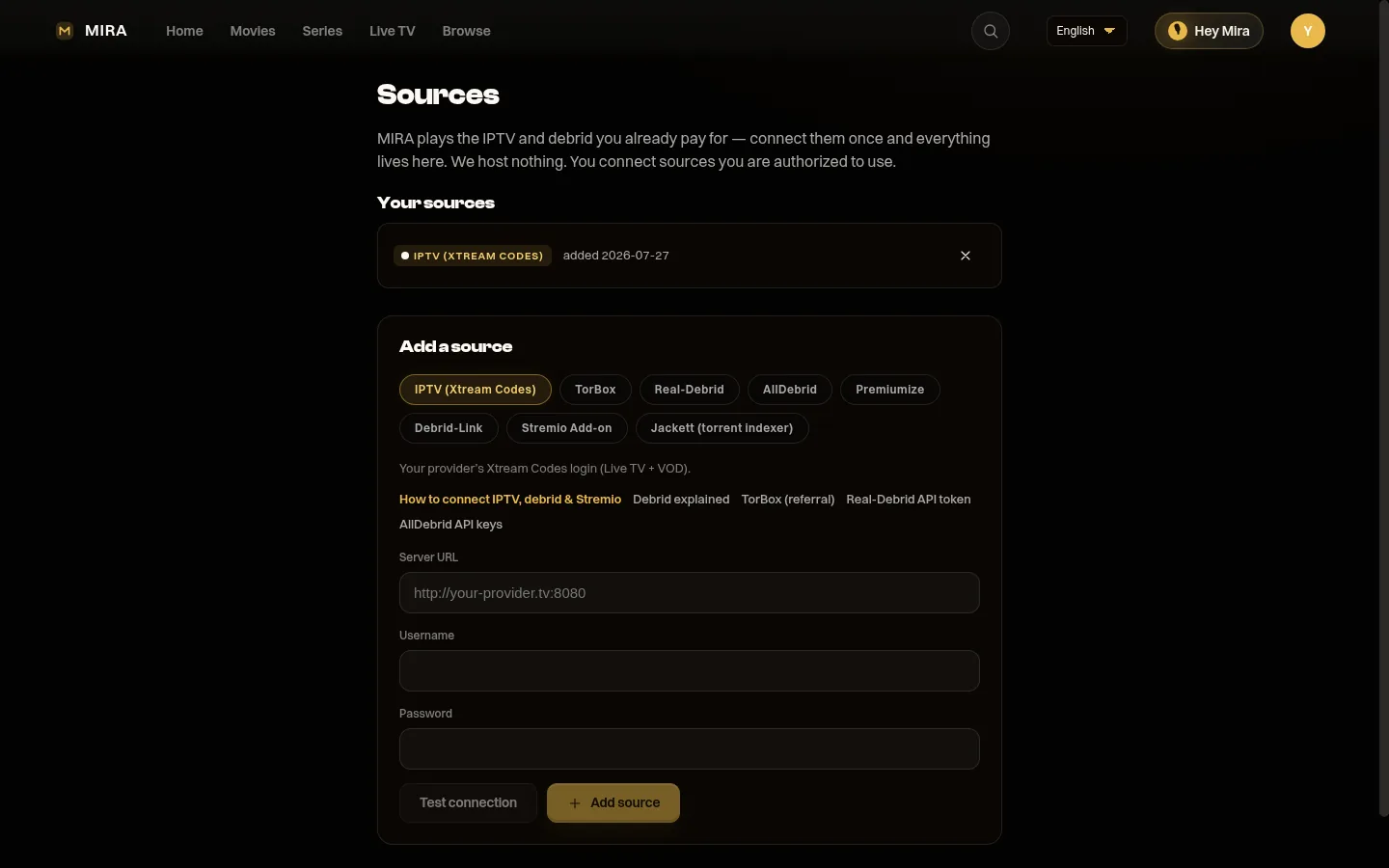
Setup takes about two minutes and comes down to copying one API key from your debrid account into the player. You install the player, open the source manager, choose your service, paste the key, and let it read your account. There are no addons, no repositories, and no per-title configuration. Here is the full walk-through so nothing is left to guess.
Step one: get your API key. Log in to your debrid account on the web. Real-Debrid exposes a personal API token in the device or API section of your account settings, and TorBox provides an API key under its settings as well. Treat this key like a password. Anyone holding it can read your account, so do not paste it into screenshots or share it in support threads.
Step two: install the player and open the source manager. Install MIRA Player from miraplayer.tv/get on your Android TV device (a quick Downloader install; there is no Play Store listing yet). Open it, navigate to Sources, and choose Add Source. Pick Real-Debrid or TorBox from the list of source types.
Step three: paste the key and let the player read your account. Enter the API key. The player validates it against the service, then reads the cached files linked to your account and organizes them by title and quality into your library. You can repeat the process to add the second debrid service, and you can add your IPTV playlists the same way so live channels and on-demand content share one library.
Step four: confirm failover has something to work with. Open any title that appears under more than one source and check the "Available On" view. If a title lists two or more sources, failover can rotate between them when one dies. Titles backed by a single source still play; they just do not have a fallback, which is the honest tradeoff of any failover system. The more sources you connect, the more often a given title has a backup.
How do you choose the best debrid streaming player for Android TV?
Choose by what you actually watch. If you only stream movies and shows from debrid and do not need live TV, a free addon-based player covers you. If you want live TV with EPG, family profiles, and a failover safety net across both IPTV and debrid, the field narrows fast. The decision lines below make the tradeoff explicit so you pick the right tool rather than the most-hyped one.
Pick Stremio if: you watch only movies and TV shows from debrid, you do not need live TV or an EPG, and you are comfortable adding a community addon. It is free, it works, and it has a large addon ecosystem.
Pick Kodi if: you are willing to invest time in setup and customization and you want a media center that can be pushed well beyond typical streaming. Expect a learning curve and some maintenance.
Pick TiviMate if: IPTV is your only use case and you want one of the best pure IPTV experiences available. You will still need a separate app for debrid, which is the cost of that focus.
Pick MIRA Player if: you want one player for IPTV and debrid together, with automatic failover across sources, ranked quality auto-pick, family profiles, and a privacy-first design with encrypted credential storage. It costs $20/year and includes a 7-day money-back guarantee.
If you already run both IPTV and debrid, the time you spend switching apps and hunting links makes a unified player the cheaper choice in convenience alone. For a feature-by-feature breakdown against the leading IPTV player, see the TiviMate vs MIRA Player comparison. If you are still deciding whether debrid is even right for you, start with the plain-English explainer on what is debrid. And if you are mapping out the bigger move away from cable, our cord-cutting guide for 2026 puts it all in context.
Frequently asked questions
What is a debrid streaming player?
A debrid streaming player is an Android TV app that connects to debrid services like Real-Debrid and TorBox to stream cached torrent content directly on your TV, without needing a computer or casting. It provides a native TV interface, library organization, and automatic source resolution.
Does MIRA Player work with Real-Debrid and TorBox?
Yes. MIRA Player has native support for both Real-Debrid and TorBox. You enter your API key once in the source manager, and the player reads all your linked files automatically. You can connect multiple debrid accounts and let the player rank and fail over between them.
Can I use debrid without a VPN with a debrid streaming player?
Debrid services use encrypted HTTPS connections and do not expose your IP to peers, since they stream from their own servers rather than from a swarm. In most countries this means a VPN is not required for the streaming itself. Always check the laws where you live regarding torrenting, even when a debrid service is involved.
What happens if a debrid link fails?
In MIRA Player, if a debrid link fails, the multi-link auto-failover feature rotates to another available source for the same title, such as a link from a different debrid service or an IPTV stream. In players without failover, such as Stremio or Kodi, you select another link by hand or restart the search.
Is MIRA Player better than Stremio for debrid streaming?
It depends on your needs. Stremio is free and works well for users who only watch movies and shows. MIRA Player adds live TV with a premium EPG guide, family profiles, and multi-link auto-failover (catch-up and recording are on the roadmap). If you want a single player for all your sources including IPTV, MIRA Player is the stronger choice. If you only watch on-demand content and do not mind a separate app for live TV, Stremio is fine.
How do I set up Real-Debrid or TorBox in MIRA Player?
Install MIRA Player from miraplayer.tv/get (a quick Downloader install; there is no Play Store listing yet). Open the app, go to Sources, choose Real-Debrid or TorBox, and paste your API key from your debrid account settings. The player validates the key and reads your library within seconds. No addons or extra configuration are needed.
Stop juggling apps. Connect your Real-Debrid, TorBox, and IPTV subscriptions in one premium player you control, with auto-failover.
Get MIRA Player — $20/year