How to add an M3U or Xtream source to MIRA Player on Google TV
Sources are added on the web. The TV app picks them up when you sign in.
Last verified:
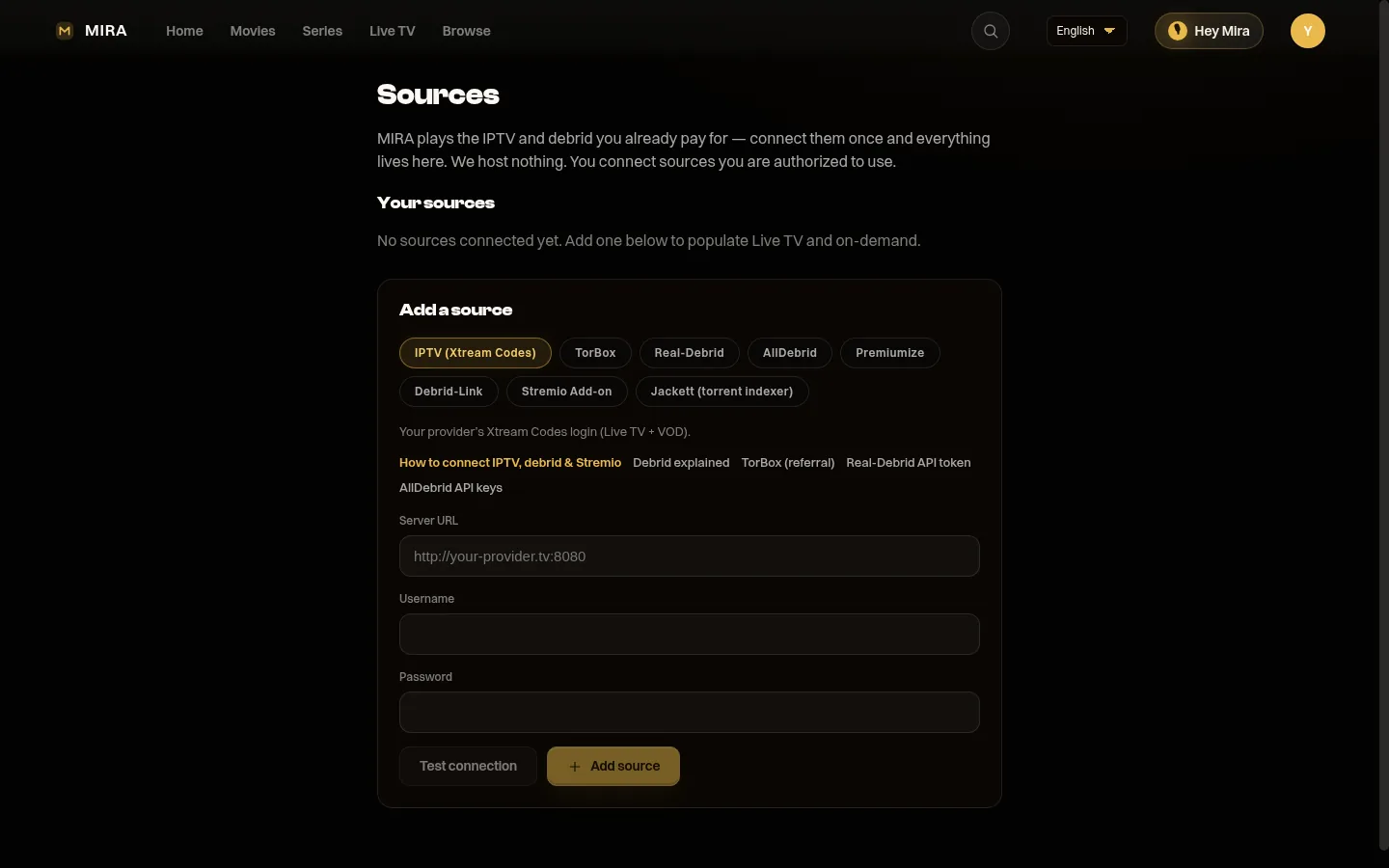
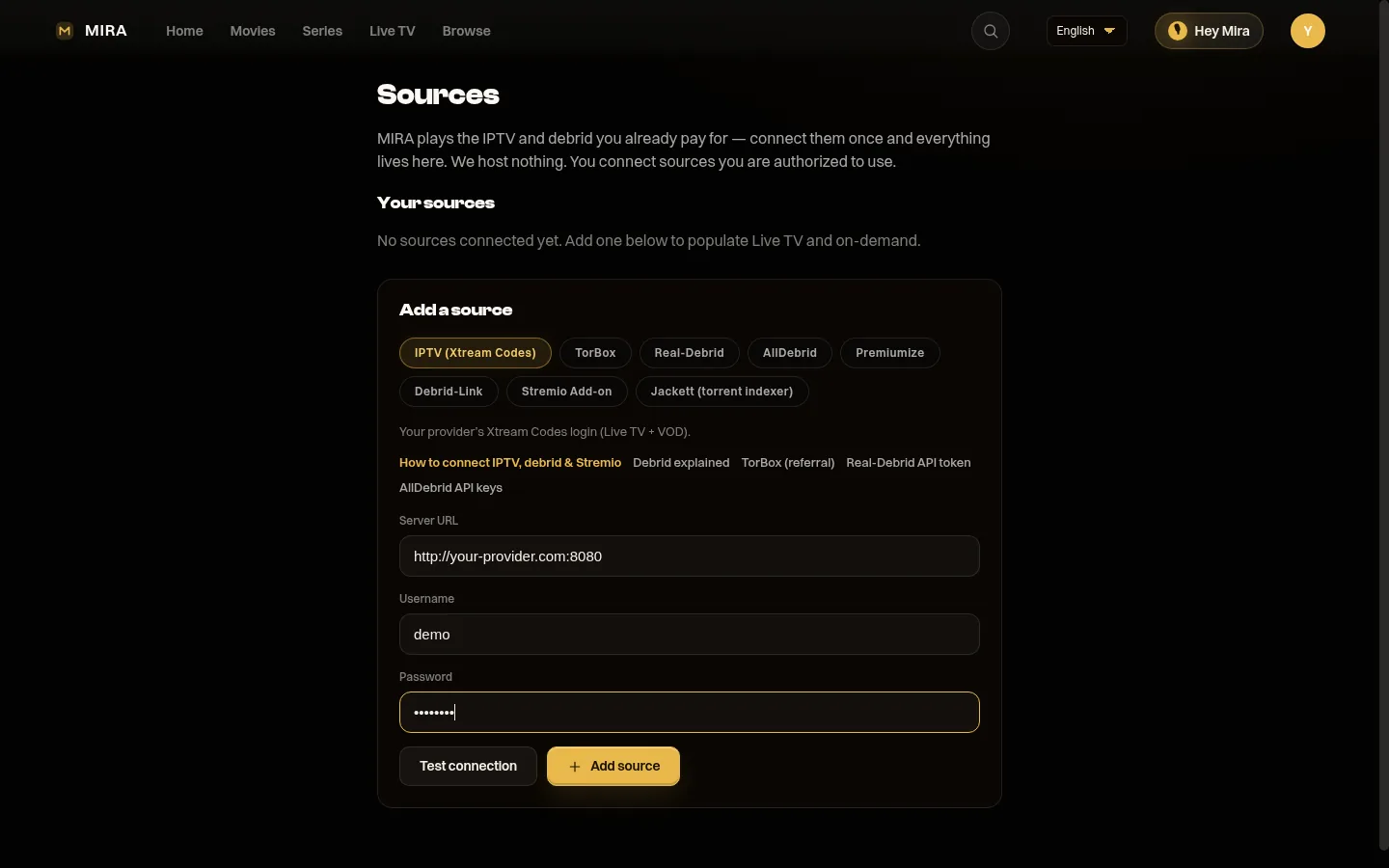
You add an M3U playlist or Xtream login on the web, not with the TV remote. In the TV app, the Connect your sources card has a button that opens miraplayer.tv/app/sources. You can also go to miraplayer.tv/account then Sources. Choose M3U playlist and paste the Playlist URL, or choose Xtream Codes and fill Server URL, Username and Password. Press Test connection, then Add source. MIRA Player includes no channels, so use your own provider.
Steps
- Open the Connect your sources card. In the TV app, the Connect your sources card has a button that opens miraplayer.tv/app/sources. On a phone or computer, go to that address or to miraplayer.tv/account and open Sources, and sign in with the same account as the TV.
- Pick the source type. Under Add a source choose M3U playlist, or IPTV (Xtream Codes). A single address ending in .m3u or .m3u8 is an M3U playlist. A server address plus a username and password is an Xtream Codes login.
- Fill in the fields. For M3U paste your provider address into the Playlist URL field. For Xtream fill Server URL, Username and Password. Use only a source you are authorized to use.
- Press Test connection, then Add source. MIRA checks the source and saves it to your account. It syncs to every device you are signed in on.
- Open Live TV on the TV. Open the TV app and go to Live TV. Give the first sync a moment. The program guide comes from your provider and is partial, not complete.
On the TV you can also open Settings and scan the QR code with your phone to reach the Sources page. If the TV says it can't open a web browser, use a phone or computer and go to miraplayer.tv/app/sources. A title that shows “Connect a source to play this” has no source connected yet.
Which fields for which source
| Source | Choose | You enter |
|---|---|---|
| M3U or M3U8 playlist | M3U playlist | Playlist URL |
| Xtream Codes login | IPTV (Xtream Codes) | Server URL, Username, Password |
| Debrid (Real-Debrid, TorBox, AllDebrid, Debrid-Link) | Your debrid service | API key |
| Stremio add-on | Stremio add-on | Your add-on details, see Help: Stremio add-on |
Things to know
- Why not on the TV: long passwords and API keys are painful with a remote. You enter them once on a keyboard and every signed-in device uses them.
- Debrid is not live TV: a debrid key adds on-demand sources only. Live TV needs real IPTV channels from an M3U playlist or Xtream login.
- Saved is not the same as playing: a saved playlist does not prove every entry plays. Availability depends on your provider and network.
- No content included: MIRA Player is a player only. Bring your own sources and any subscription they need.
More detail: Help: add an M3U or Xtream source, Help: add a debrid key and How to connect your sources in MIRA Player.
MIRA Player hard facts
Checked 2026-10-28. Source of record: miraplayer.tv/facts/.
- This device: Sources are added on the web at miraplayer.tv/app/sources, not on the TV remote. Google TV and Android TV install from Google Play.
- Price: $20 per year or $99 one-time lifetime. No trial period. 7-day refund on web purchases, lifetime included.
- One app: Your own IPTV (M3U and Xtream Codes), debrid (TorBox, Real-Debrid, AllDebrid, Debrid-Link) and Stremio add-ons in one catalogue, with watchlist, search and Continue Watching.
- Guide: Live TV with a program guide and now/next. Guide data comes from your provider, so coverage varies by source and is not complete. No catch-up. No recording.
- Sources: Bring your own. MIRA Player includes no channels, movies or streams.
- Available now: Android TV and Google TV (Google Play, Android 7 or newer). Android phone and tablet: Google Play (listing ID mira.player.tv). Fire OS by sideload (not Vega OS). Web player at miraplayer.tv/app, including Safari on iPhone and iPad.
- Early access: Desktop build 0.1.2 for Mac (Apple Silicon), Windows x64 and Linux x64 at miraplayer.tv/get.
- Not available: Native iPhone or iPad app, Apple TV, Roku.
- Multiview: Web player only, up to four streams, device-limited.
Questions people ask
Can I add an M3U playlist on the TV remote?
No. Sources are added on the web at miraplayer.tv/account then Sources, or miraplayer.tv/app/sources. The TV app shows a Connect your sources card with a button that opens that page.
How do I tell M3U from Xtream?
A single address ending in .m3u or .m3u8 is an M3U playlist, entered in the Playlist URL field. A server address plus a username and a password is an Xtream Codes login, entered as Server URL, Username and Password.
Where does the TV get my source after I add it?
Sources are saved to your account and sync to every device you sign in on. Sign in to the TV app with the same account.
Will a debrid key give me live TV channels?
No. Debrid alone does not add live TV channels. Live TV needs an IPTV playlist or Xtream login from your own provider.
Is the program guide complete?
No. The guide and now/next come from your provider, so coverage varies by source and is partial.
Does MIRA Player supply channels or a playlist?
No. It is a player only. You bring your own sources and are responsible for being authorized to use them.
MIRA Player is a media player. It provides no channels, movies or content.